Oct 17, 2026
How Do I Choose the Right M8 8 Pin Female Connector for My Equipment?
An M8 8 pin female connector can look like the right replacement on a purchasing list and still…

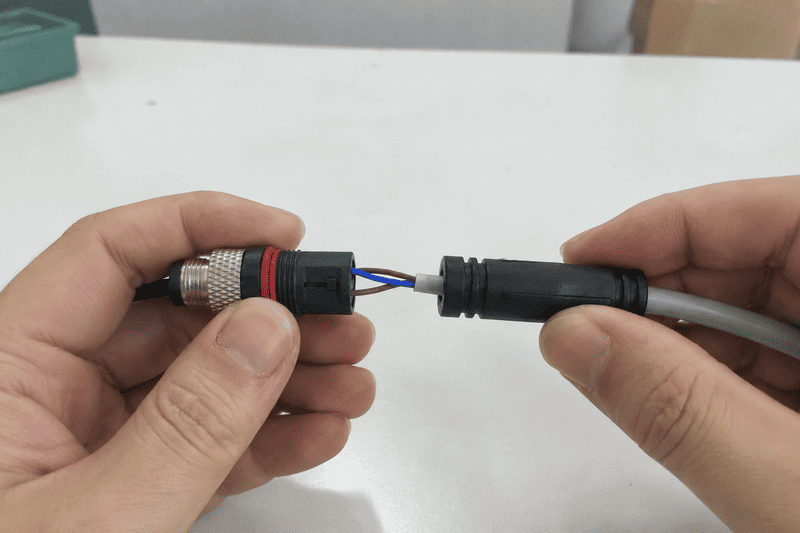
Installing an M12 connector seems simple — until water gets in, a signal drops, or a wire breaks loose after three months in the field. If you are specifying M12 connectors for industrial automation, sensor wiring, PLC cabinets, or communication switches, the installation process is a reliability decision, not just a wiring task.
Installing an M12 connector correctly requires more than inserting wires and tightening a nut. The process depends on connector type (pre-molded, field-wireable, or panel-mount), coding, pin count, cable specification, sealing condition, and the actual installation environment. A complete installation starts with selecting the right connector structure before any wire is touched.
Most installation failures we see at the factory level — waterproofing complaints, signal instability, pin mismatch — trace back to decisions made before the connector was ever wired. Understanding the full picture will save you rework, downtime, and supplier disputes.
Many installation errors start here. Not all M12 connectors are wired the same way, and treating them as interchangeable is the first mistake.
There are three distinct M12 connector types used in industrial applications.1 Each carries different installation risks, requires different tools, and has different quality-control checkpoints. Knowing which type you are working with shapes every step that follows.
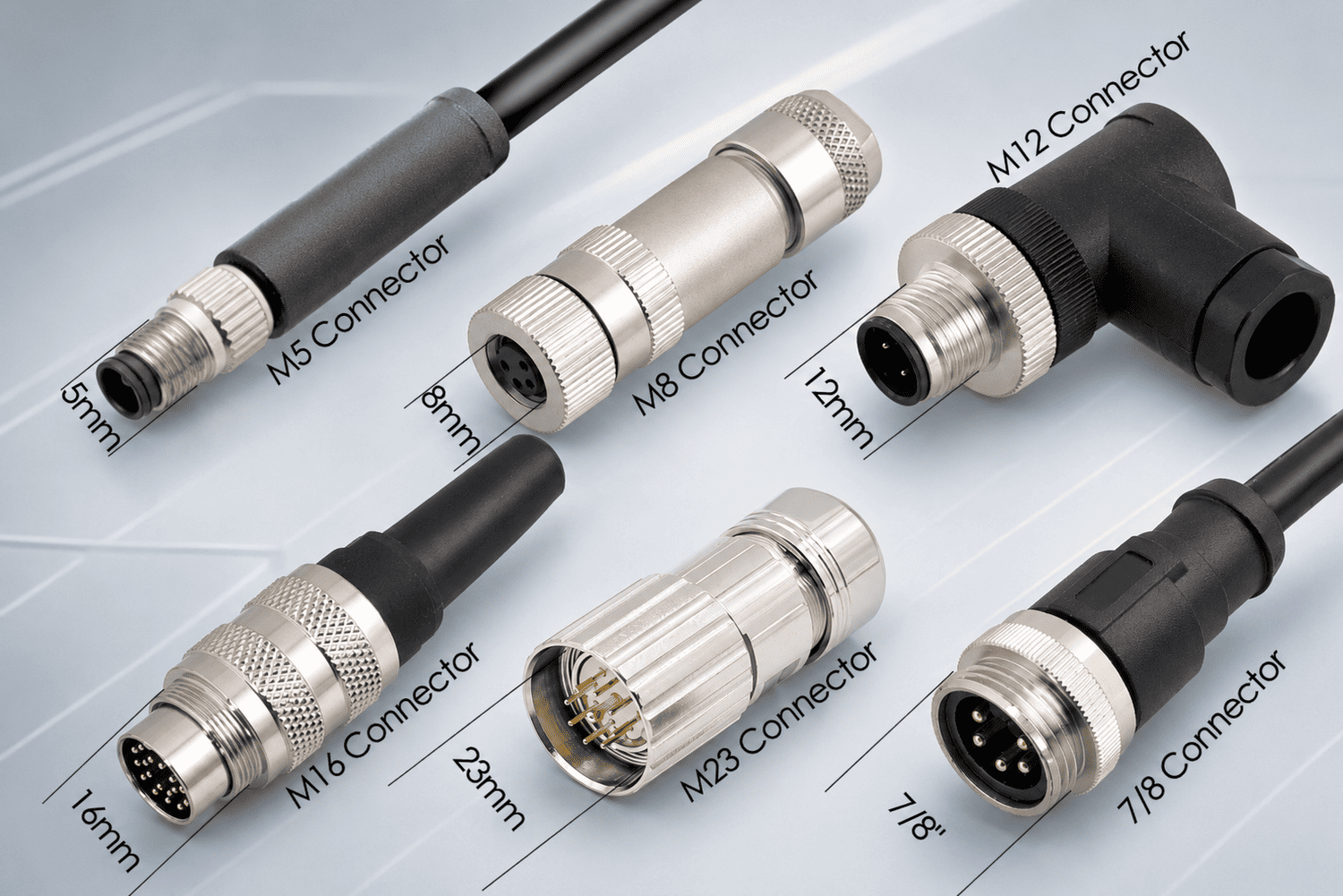
Pre-molded M12 cables are factory-assembled. The connector body is injection-molded directly over the cable termination. There is no field wiring. The installer's job is to verify the cable spec, confirm coding and pin assignment match the device port, and route and secure the cable correctly.
What can still go wrong:
From our production and sample confirmation experience, the most common complaint with pre-molded cables is not the molding itself — it is customers ordering the wrong pin assignment or gender for their device. Always confirm the mating device's pinout before specifying a cable.
Pre-molded installation checklist:
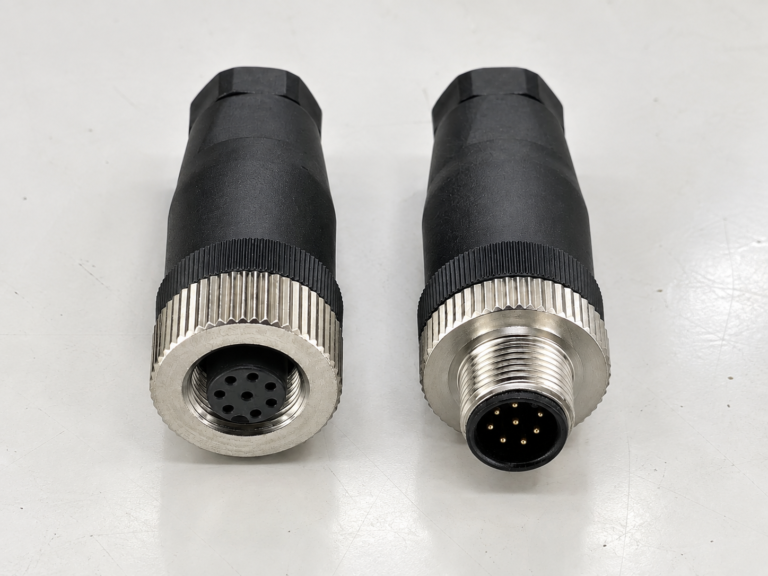
Field-wireable M12 connectors are the type most people mean when they ask "how do I install an M12 connector." These are sold as separate connector bodies that an engineer or technician wires in the field or on the production line.
This is where installation complexity is highest. You are managing individual conductors, sealing performance, correct torque, and correct pin-to-conductor assignment — all in a compact 12 mm body.
Core installation risks for field-wireable types:
I will cover the step-by-step process for field-wireable connectors in the dedicated section below. But note: the correct wiring sequence and pin assignment cannot be given in isolation. They depend on coding, pin count, signal type, and device interface.
Panel-mount M12 connectors are installed into a control cabinet panel, machine frame, or equipment housing. They provide the fixed port that a cable plug connects to.
The installation here is mechanical and sealing-focused rather than wiring-focused, though the rear termination (solder, PCB, or screw) still requires attention.
Key panel-mount installation points:
Skipping a pre-installation check is where most downstream problems are created. This is something we consistently see in customer feedback and sample confirmation rounds.
Before touching any wire, run through these eight verification points. They take five minutes and can prevent a full rework cycle.
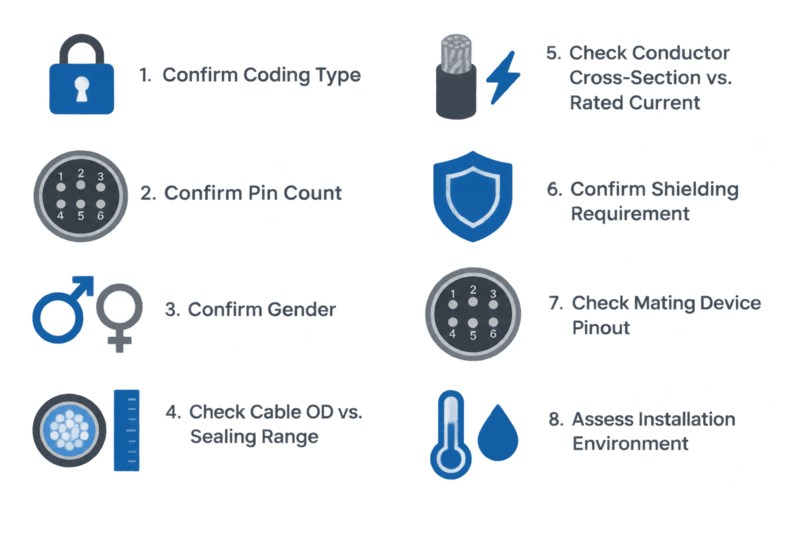
M12 connectors use keyed coding systems to prevent mismatch between connectors with different signal or power functions.2 The most common coding types are:
| Coding | Typical Application | Pin Count |
|---|---|---|
| A-code | Sensors, I/O signals, DC power | 3, 4, 5, 8, 12 pin |
| B-code | Fieldbus (PROFIBUS) | 5 pin |
| C-code | AC power | 4 pin |
| [D-code | Industrial Ethernet (100 Mbps)](https://sieportal.siemens.com/en-us/products-services/10029408)%%%FOOTNOTE_REF_3%%% | 4 pin |
| X-code | Industrial Ethernet (Gigabit/10G) | 8 pin |
| S-code | AC/DC power (high current) | 4 pin |
| T-code | AC/DC power (high current) | 4 pin |
| K-code | AC power | 5 pin |
| L-code | PROFINET, Industrial Ethernet | 4 pin |
A-code and D-code connectors both have 4-pin variants and look visually similar. They are not interchangeable. Connecting an A-code cable to a D-code Ethernet port can damage the device or cause communication failure. Always verify coding against the device's datasheet or port marking.
Pin count must match between connector and device. Common M12 pin configurations: 3-pin, 4-pin, 5-pin, 8-pin, 12-pin, 17-pin. A 4-pin connector will not mate correctly with a 5-pin socket.
Male plugs carry pins. Female sockets carry contacts. The connector gender must be opposite to the device port gender. Check your device port before ordering.
Each field-wireable M12 connector specifies an acceptable cable outer diameter range for the cable gland seal — for example, 4.0–6.0 mm or 5.0–8.0 mm. This range is defined on the product datasheet.
If the cable OD is outside this range:
Always check the cable OD against the connector's specified sealing range before assembly. This single check prevents the majority of waterproofing failures we see reported by customers.
The connector's contact pins have a maximum rated current. The cable conductor cross-section must be appropriate for the circuit's current load. Using undersized conductors on a high-current circuit creates heat, voltage drop, and potential contact damage.4
Some applications — especially Ethernet, fieldbus, and high-frequency signals — require shielded cable.5 Check whether the connector supports and requires a shield connection. If it does, confirm how the shield is terminated (drain wire to a specific pin, or 360° foil termination to the connector body).
This is the most important wiring check. The pin numbering on M12 connectors follows a standardized face view, but the conductor-to-function assignment varies by device, signal type, and manufacturer. Never assume a standard wiring sequence without cross-referencing the device's datasheet.
Now the actual installation process. The steps below apply to a standard screw-termination or IDC-termination field-wireable M12 connector. Always follow the specific product's installation sheet first — this is a general framework, not a substitute for product documentation.
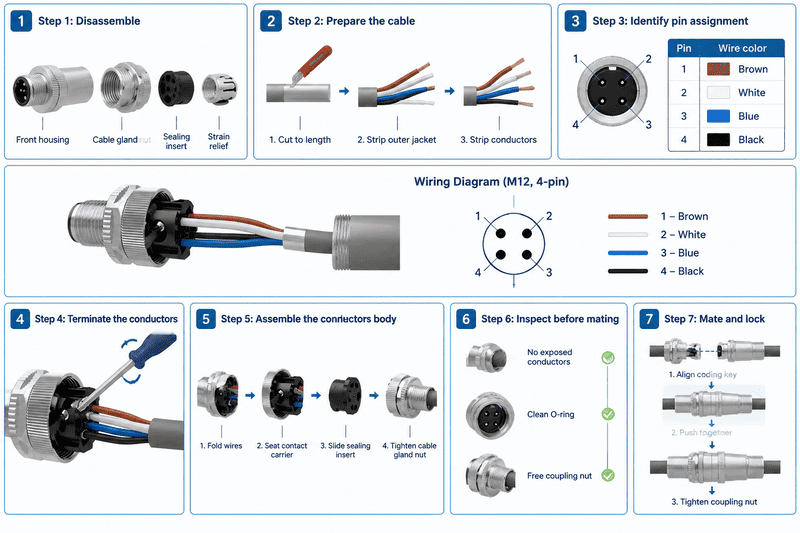
Field-wireable M12 connectors typically separate into three or four parts:
Thread the cable gland nut and sealing insert onto the cable before making any terminations. This is a step that is frequently forgotten, requiring you to disassemble and redo all the terminations.
Strip length matters. Too short: the conductor does not make full contact with the terminal. Too long: bare conductor extends beyond the terminal, risking short circuit with adjacent contacts.
Before inserting any wire, confirm the pin-to-conductor assignment from the mating device's datasheet. M12 pin numbering follows the IEC 61076-2-101 standard for face view6 (looking into the connector face), but:
Example: A-code 4-pin sensor cable (common convention, verify with device):
| Pin | Color (common) | Typical Function |
|---|---|---|
| 1 | Brown | +24 V DC supply |
| 2 | White | Signal / Input |
| 3 | Blue | 0 V / GND |
| 4 | Black | Signal / Output |
This is a frequently used convention — it is not universal. Some device manufacturers use different assignments. Verify against your specific device datasheet every time.
For screw terminal connectors:
For IDC (insulation displacement contact) types:
Torque on the cable gland nut is not just about mechanical security. It directly compresses the sealing insert around the cable jacket. Under-torque means inadequate sealing. Over-torque can deform the seal or crack the housing. Use the product datasheet value.
Before connecting to the device:
This is one of the most misunderstood points in M12 connector installation. Customers often report IP67 failure after installation and assume the connector is defective. In many cases, the seal was never properly achieved.
IP67 or IP68 performance is not a fixed property of the connector alone. It is the result of a correctly assembled system under the right conditions.

An M12 connector's waterproof performance depends on four sealing interfaces, each of which must be correctly achieved:
| Sealing Interface | How It Works | Common Failure Mode |
|---|---|---|
| Front face O-ring (mated seal) | O-ring between plug face and socket face compresses when coupling nut is torqued | Insufficient torque, damaged O-ring, debris on sealing face |
| Cable gland seal | Elastomeric insert compresses around cable jacket | Cable OD outside seal range, insufficient gland torque |
| Internal housing seal | Housing halves seal against each other | Incorrect assembly, housing damage |
| Panel-mount gasket (for chassis sockets) | Gasket between connector flange and panel | Panel surface damage, incorrect cutout, insufficient mounting torque |
IP67: Protected against temporary immersion in water up to 1 meter for 30 minutes under static conditions.8 IP68: Protected against continuous immersion at depths and durations defined by the manufacturer9
"IEC metric screw sized connectors", https://en.wikipedia.org/wiki/IEC_metric_screw_sized_connectors. A standards-based or institutional technical reference on M12 circular connectors supports the distinction between cable assemblies, field-attachable connectors, and receptacle or panel-mount configurations; the reference provides category context rather than proving that these are the only possible industrial M12 formats. Evidence role: general_support; source type: institution. Supports: A neutral connector standard or technical reference should document common M12 connector configurations, including cable assemblies, field-attachable connectors, and receptacles or panel-mount versions.. Scope note: The source may describe recognized configurations rather than establish an exhaustive taxonomy. ↩
"IEC metric screw sized connectors", https://en.wikipedia.org/wiki/IEC_metric_screw_sized_connectors. IEC-oriented descriptions of M12 circular connectors define multiple keyed coding variants, such as A-, B-, D-, and X-coding, which are used to distinguish mating interfaces for different signal or power applications. Evidence role: definition; source type: institution. Supports: The source should define M12 connector coding or keying and explain that different coding types correspond to different connector applications or mating interfaces.. ↩
"IE FC M12 plug PRO 2x2 (D-coded) - SiePortal - Siemens", https://sieportal.siemens.com/en-us/products-services/10029408. Industrial Ethernet and connector-standard references associate four-pin D-coded M12 interfaces with 100BASE-TX-class industrial Ethernet connections, supporting the article's coding-to-application mapping. Evidence role: general_support; source type: institution. Supports: The source should support that D-coded M12 connectors are commonly specified for 100BASE-TX or 100 Mbps Industrial Ethernet interfaces.. Scope note: This supports a common standardized use case, not every possible proprietary use of D-coded M12 connectors. ↩
"Wire Gauge Chart and Ampacity | Guide for Electricians", https://www.uti.edu/blog/electrical/wire-gauge-chart-awg-ampacity. Electrical safety and ampacity references explain that conductor resistance and current determine voltage drop and resistive heating, so conductors below the required current-carrying capacity can overheat and compromise terminations. Evidence role: mechanism; source type: government. Supports: The source should explain that conductor size, current, resistance, heating, and voltage drop are related and that inadequate ampacity can cause overheating.. Scope note: The source supports the electrical mechanism; the degree of contact damage depends on connector design, ambient temperature, and duty cycle. ↩
"Electromagnetic Interference Mitigation in Industrial ...", https://www.flukenetworks.com/blog/cabling-chronicles/electromagnetic-interference-mitigation-industrial-ethernet-cabling. EMC and industrial-network cabling guidance explains that shielded cables can reduce electromagnetic interference coupling and support signal integrity in Ethernet, fieldbus, and other high-frequency installations. Evidence role: mechanism; source type: research. Supports: The source should explain that cable shielding helps control electromagnetic interference and preserve signal integrity in industrial communication or high-frequency signal environments.. Scope note: The source supports the general engineering rationale; the need for shielding in a specific installation depends on protocol requirements, cable construction, grounding, and the electromagnetic environment. ↩
"IEC metric screw sized connectors", https://en.wikipedia.org/wiki/IEC_metric_screw_sized_connectors. IEC 61076-2-101 is the standards reference for M12 circular connector interfaces and contact arrangements, supporting the article's use of a standardized connector-face pin-numbering convention. Evidence role: definition; source type: institution. Supports: The source should confirm that IEC 61076-2-101 covers M12 circular connector interfaces and contact arrangements or pin numbering.. Scope note: Access to the full IEC text may be restricted, so a secondary standards summary may provide contextual rather than complete normative detail. ↩
"Sensor Actuator wiring standards when using M12/8 ...", https://www.reddit.com/r/PLC/comments/1jixqhm/sensor_actuator_wiring_standards_when_using_m128/. Industrial sensor/actuator wiring references describe common conductor color conventions, including brown, white, blue, black, and grey, for multi-conductor M12 cable assemblies. Evidence role: definition; source type: institution. Supports: The source should document common conductor color conventions for sensor/actuator cables used with M12 connectors.. Scope note: The source supports a common convention rather than a universal rule; manufacturers may publish different assignments for specific devices. ↩
"IP code", https://en.wikipedia.org/wiki/IP_code. IEC 60529-based IP Code references define IP67 as protection against dust ingress and temporary water immersion, commonly specified as immersion up to 1 meter for 30 minutes under standard test conditions. Evidence role: definition; source type: institution. Supports: The source should define the IP67 water-ingress protection level according to IEC 60529 or an equivalent standards summary.. ↩
"IP code", https://en.wikipedia.org/wiki/IP_code. IEC 60529-based IP Code references describe IP68 as protection for continuous immersion under conditions specified for the equipment, supporting the article's statement that depth and duration are manufacturer-defined. Evidence role: definition; source type: institution. Supports: The source should define IP68 and clarify that immersion conditions are more severe than IP67 but are specified for the product rather than fixed universally.. ↩
An M8 8 pin female connector can look like the right replacement on a purchasing list and still…

An M12 male connector 5-pin B-coded may look like a straightforward line item, but its name does not…
M12 connectors can carry different voltage ratings, so a buyer cannot choose one safely from the connector size…
NITAI manufactures terminal blocks, M8/M12 waterproof connectors and industrial distribution modules for global OEMs, distributors and automation customers.
Leave a Reply