Oct 16, 2026
What Is an M12 Male Connector 5-Pin B-Coded?
An M12 male connector 5-pin B-coded may look like a straightforward line item, but its name does not…

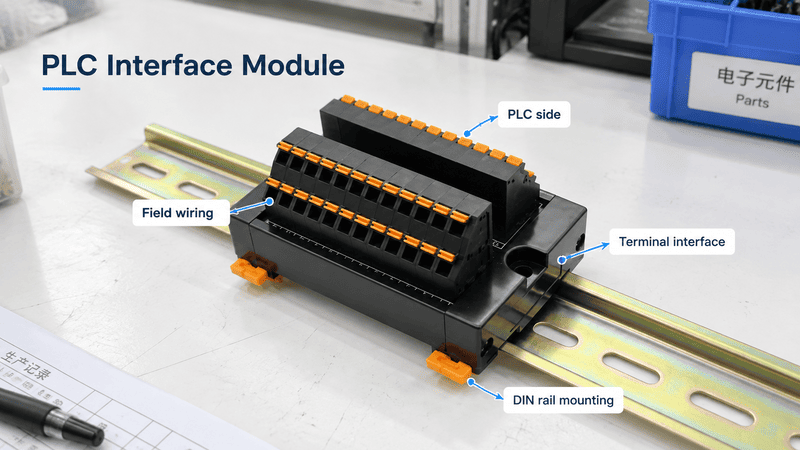
A module in a PLC is a hardware unit that performs a defined control-system function. Depending on the PLC architecture, that function may be processing the program, supplying system power, reading digital or analog inputs, controlling outputs, communicating over an industrial network, performing high-speed technology tasks, or handling safety-related signals. A PLC module is not automatically the same as an external PLC interface module used to organize field wiring.
A complete PLC hardware view separates the CPU, power, I/O, communication, and technology modules inside the control system from the external terminal, relay, and distribution interfaces used between the PLC and field devices.
Hi, I am Penny from NITAI. When someone asks me for a “PLC module,” I first ask where it sits and what it must do. A CPU module, digital input card, communication module, remote I/O adapter, and connector-to-terminal interface solve different problems. NITAI works on the connection side of the cabinet—terminal conversion, field wiring, relay or signal interfaces, and power distribution. We do not manufacture PLC CPUs or present an external interface as original PLC I/O hardware.
| If someone says “PLC module,” they may mean | Its main job | Does it normally become part of the PLC configuration? |
|---|---|---|
| CPU or controller module | Executes the control program and manages the system | Yes |
| Power-supply module | Supplies the controller or backplane | Yes |
| Digital or analog I/O module | Exchanges electrical signals with field devices | Yes |
| Communication module or adapter | Connects the PLC or remote I/O to a network | Yes |
| Technology or function module | Handles a specialized task such as counting or positioning | Yes |
| Safety I/O module | Handles safety-related input or output functions in an approved system | Yes |
| External PLC interface module | Breaks out, routes, switches, protects, isolates, or conditions field wiring | Usually no |
IEC 61131-2 covers functional and electromagnetic-compatibility requirements and verification tests for PLCs, PACs, and associated peripherals used in industrial control.1 It provides an important equipment framework, but it does not make every manufacturer’s module mechanically or electrically interchangeable. The exact hardware manual, catalog number, and system configuration remain decisive.
In a PLC system, a module is a replaceable or identifiable hardware unit assigned to one or more functions. It may process logic, provide power, receive inputs, drive outputs, communicate with another system, or execute a specialized control task.
The word module describes functional organization, not one universal shape. In a modular PLC, the CPU, power supply, input cards, output cards, and communication units may be physically separate. In a compact PLC, several of those functions may be integrated into one controller body, while plug-in or expansion modules add capability later.
Two products may have similar housings but completely different electrical roles. I therefore classify a module first by system function—processing, measurement, switching, communication, power, safety, or wiring interface—and then by its physical position in the controller.
| Term on a drawing or quotation | What I expect it to mean | What still needs confirmation |
|---|---|---|
| CPU module | Controller processor and memory | Exact PLC family, model, communication ports, program capacity, and supported expansion |
| Input module | Receives signals from field devices | Digital/analog type, signal range, channel count, common arrangement, and isolation |
| Output module | Controls field circuits | Transistor/relay/triac/analog type, load voltage, load current, and protection |
| Function module | Dedicated special-purpose hardware | The exact function: counting, motion, position, temperature, weighing, or another task |
| Interface module | Could mean a rack/network interface or a field-wiring interface | Its location, network role, connector, circuit, and whether it participates in PLC configuration |
| Distribution module | Could distribute system power or field power | Voltage domain, total current, branch current, protection, and internal bus arrangement |
A module name is therefore only the first layer of information. If the documentation says interface module, power module, or function module, I still look for the manufacturer’s block diagram. The block diagram shows whether the device exchanges PLC backplane data, merely routes conductors, or adds an active electrical function.
Rockwell Automation’s Micro800 selection guide, for example, compares controllers with embedded I/O and then identifies compatible plug-in and expansion options by controller model.2 That is a product-family example, not a universal naming rule, but it shows why the full controller catalog number matters.
| Selection point | Compact PLC | Modular PLC |
|---|---|---|
| Initial construction | CPU and a defined set of functions in one body | Separate CPU, power, I/O, and optional modules |
| Built-in I/O | Common, but quantity and type are fixed by model | May be absent from the CPU; selected through separate I/O modules |
| Expansion | Possible only within model-specific limits | Normally broader, but still platform- and rack-specific |
| Cabinet space | Often efficient for smaller machines | Better suited when channel mix, redundancy, or expansion justifies more hardware |
| Replacement strategy | An integrated fault may affect more functions in one unit | Individual modules may be replaceable, subject to system procedures |
| Engineering effort | Simpler for a fixed, small application | More hardware selection, power calculation, addressing, and configuration |
| Best fit | Stable I/O count and modest communication needs | Larger or changing I/O count, special functions, remote I/O, or more complex architecture |
A compact PLC often suits a machine with a predictable signal count, matching built-in I/O, limited panel space, and modest expansion. A modular platform is more suitable when the project needs a tailored mix of digital, analog, safety, communication, or technology functions. The extra flexibility also creates more compatibility checks: CPU, base, firmware, engineering software, power budget, and installation position.
The main PLC-module groups are CPU, power-supply, digital I/O, analog I/O, communication, technology or specialty, safety, and remote-I/O interface modules. Manufacturers may use different names, so the function and system manual are more reliable than the label alone.
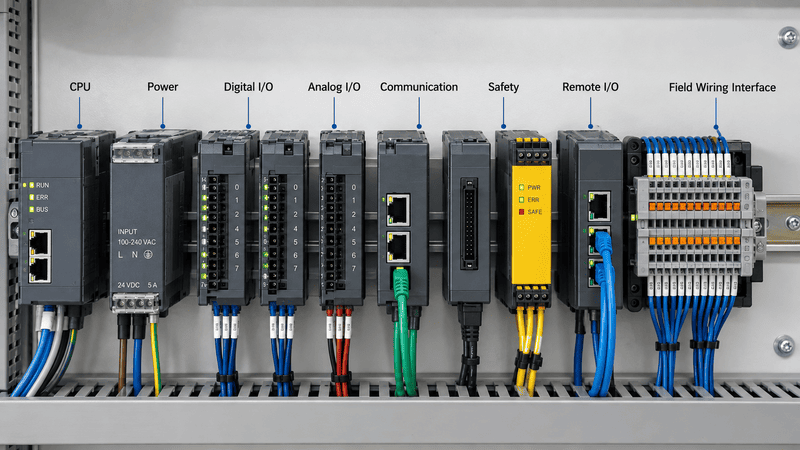
The module type identifies the task: processing, system power, discrete or analog signal exchange, network communication, specialized control, safety processing, or connection of a remote I/O station.
| Module type | Primary function | Typical information to verify | Common misunderstanding |
|---|---|---|---|
| CPU/controller module | Executes the user program and coordinates I/O and communications | Model, memory, scan performance, ports, supported modules, firmware | The CPU alone may not provide every required I/O point |
| System power-supply module | Supplies CPU/backplane/system electronics | Input voltage, output capacity, slot or position, redundancy, backplane budget | It may not power all field devices |
| Digital input (DI) module | Reads ON/OFF states | AC/DC range, ON/OFF thresholds, source/sink logic, channel common, filter time | “24 V input” is not a complete wiring specification |
| Digital output (DO) module | Switches discrete loads | Transistor, relay, or triac type; voltage/current; inrush; leakage; group limits | Many outputs switch an external supply rather than generate load power |
| Analog input (AI) module | Measures variable voltage, current, resistance, or temperature signals | Signal range, resolution, accuracy, input impedance, isolation, wiring method | A 0–10 V input does not necessarily supply 10 V to a sensor |
| Analog output (AO) module | Produces a variable command signal | Voltage/current range, load resistance, accuracy, settling time, isolation | It is a control signal, not a general-purpose power output |
| Communication module | Adds network or serial communication | Protocol, physical layer, ports, supported topology, connection capacity, configuration | A connector type alone does not prove protocol compatibility |
| Technology/function module | Performs a specialized time-critical or measurement task | Supported function, channel type, frequency, resolution, timing, software object | It is not simply another standard I/O channel |
| Safety CPU or safety I/O | Performs defined safety-related control functions | Approved platform, safety integrity/performance target, wiring, diagnostics, validation | A standard I/O card cannot become safety I/O through labeling or programming alone |
| Remote-I/O adapter/interface module | Connects an I/O station to the controller network | Network, adapter capacity, supported I/O, power, topology, firmware | It is different from a passive connector-to-terminal interface |
Siemens describes the S7-1500 family as supporting signal modules for input/output and technology modules for specialized functions such as counting.3 Rockwell Automation’s official I/O overview similarly describes I/O modules as the link between plant-floor devices and controllers.4 These sources use their own product architectures, but together they show why “PLC module” covers multiple hardware roles.
In a modular system, the rack, base, or backplane provides a defined mechanical and electrical connection among compatible modules. Depending on the platform, it carries system power, data, timing, addressing, and diagnostic information between the CPU, adapters, and I/O modules.
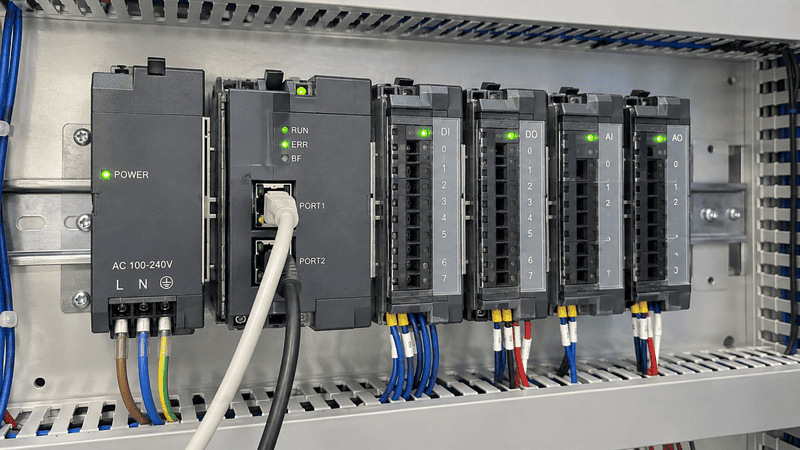
A backplane is more than a mounting rail: it can distribute internal power and provide the data path through which the controller identifies, configures, and exchanges information with installed modules.
Not every PLC uses a large metal chassis. Some systems use a physical rack; some modules connect side by side through a bus connector; others snap onto terminal bases that form a local bus. The implementation changes, but the selection questions are similar.
Depending on the platform, it may carry:
Internal backplane power and field-side power should not be treated as the same supply. A remote I/O adapter may convert incoming 24 VDC to another internal voltage for the local bus while separate terminals distribute power to sensors and output loads.
Rockwell Automation’s POINT I/O guide identifies four separate system elements: I/O modules, communication interfaces, terminal bases, and power-distribution modules. It also explains that the communication interface converts incoming 24 VDC to 5 VDC backplane power in that product family.5 The values and limits are specific to POINT I/O, but the example clearly demonstrates why internal bus power, field power, and signal channels must be checked separately.
Module position can affect slot rules, addressing, available side-bus current, expansion-power requirements, permitted module order, heat dissipation, and the need for an end cap or terminator.
The wrong module may fit physically and still be unsupported in that position. In some families, the engineering software will reject the configuration. In others, a power-budget or distance-rating error may only appear when the full rack is calculated.
I use two separate questions:
The current printed beside a terminal is not automatically the entire system limit. A design may also have per-module, per-channel, channel-group, common-terminal, connector, PCB-track, and temperature-derating limits. The manufacturer’s configuration rules should be applied to the complete arrangement, not to one component in isolation.
A PLC I/O module converts between the controller’s internal data and real electrical signals. Input modules report the condition or measured value of field devices to the PLC; output modules translate controller commands into electrical switching or analog signals for field equipment.
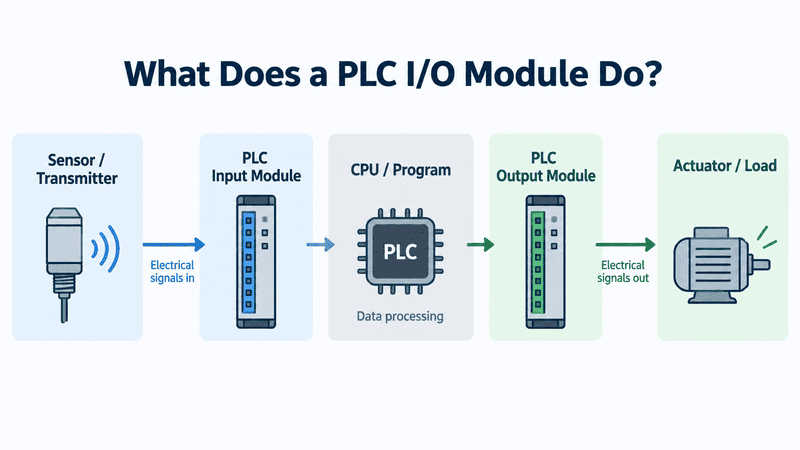
The basic control path is sensor or transmitter to input module, input data to the CPU program, and output command through an output module to an actuator or other load.
A simple sequence looks like this:
Sensor or Switch
      ↓ electrical input signal
PLC Input Module
      ↓ input data
CPU Executes Program
      ↓ output command
PLC Output Module
      ↓ switched or analog field signal
Valve, Relay, Contactor, Lamp, or Drive
That diagram is intentionally simplified. Real systems also contain power supplies, commons, protective devices, communication links, terminal interfaces, shields, and safety circuits.
A digital input module interprets a field condition as an ON/OFF state. Typical sources include pushbuttons, limit switches, proximity sensors, pressure switches, relay contacts, and fault outputs from other equipment.
A correct digital-input selection must confirm more than nominal voltage:
A digital output module controls a discrete load. Common output technologies include transistor, relay, and triac outputs.
| Output technology | Typical role | Main checks |
|---|---|---|
| DC transistor | Fast switching of compatible DC loads | Source/sink type, voltage, current, inrush, leakage, voltage drop, suppression |
| Electromechanical relay | Switching a separate rated AC or DC circuit | Contact voltage/current, load type, inrush, switching frequency, electrical life |
| Triac | Switching suitable AC loads | AC range, leakage, minimum load, heat, turn-off behavior |
The PLC output may not supply the field voltage. A transistor output usually switches an external DC supply, and a relay output usually opens or closes an externally powered circuit. The complete current path must be shown on the wiring diagram.
Analog modules exchange continuously variable process values. Common examples include 0–10 V, ±10 V, 0/4–20 mA, resistance-temperature detectors, and thermocouples. Each category has different wiring and measurement requirements.
Phoenix Contact lists an analog input module designed to acquire both voltage and current signals.6 That product is only an example, but it shows why “analog module” is incomplete without the exact signal range and wiring method.
| Analog question | Why it matters |
|---|---|
| Is the signal voltage, current, RTD, or thermocouple? | These require different front-end circuits and terminals |
| Is a 4–20 mA channel active or passive? | It determines which device supplies loop power |
| Are channels isolated? | It affects ground loops, common-mode limits, and fault propagation |
| What accuracy and resolution are required? | A channel count alone does not establish measurement quality |
| What update and filter times apply? | They affect control response and noise rejection |
| How are shields and references terminated? | Incorrect grounding can create unstable readings |
A function or technology module is dedicated hardware for a task that needs capabilities beyond ordinary digital or analog I/O, such as high-speed counting, position measurement, motion control, precise timing, weighing, or specialized temperature acquisition.
The terminology varies. One manufacturer may say technology module, another specialty module, and another function module. The safest way to identify it is to ask what time-critical or signal-specific work it performs.
Typical functions include high-speed counting, encoder acquisition, pulse-train output, position measurement, cam timing, load-cell or temperature measurement, serial communication, IO-Link master channels, and specialized motion control.
Some of these functions may be embedded in a CPU, available as a plug-in, or supplied as a separate module. That is why a statement such as “the PLC supports high-speed counting” is not enough. I would still confirm which terminals provide it, the maximum input frequency, supported encoder type, channel allocation, voltage level, and whether using that function disables or shares other resources.
The POINT I/O selection guide, for example, lists specialty modules separately from standard digital and analog I/O, including encoder/counter, very-high-speed counter, ASCII, and IO-Link products. These names apply to that family; another PLC platform may divide the same tasks differently.
| Requirement | Why standard I/O may not be enough | Information needed for a technology module |
|---|---|---|
| Count a fast encoder | Normal input filtering or scan timing may miss pulses | Encoder type, frequency, voltage, wiring, count mode, required response |
| Generate controlled pulses | A normal output may not provide deterministic pulse timing | Pulse frequency, pulse/direction format, load interface, motion profile |
| Measure temperature accurately | A standard voltage input may not support sensor compensation | RTD/thermocouple type, wire count, range, cold-junction requirements, accuracy |
| Read a load cell | Low-level sensor signals need suitable excitation and conversion | Sensor sensitivity, excitation, input range, resolution, calibration method |
| Perform local high-speed logic | CPU scan and network cycle may be too slow | Required latency, supported onboard logic, diagnostics, synchronization |
A PLC communication module adds or extends a defined network or serial communication function. It exchanges data using a supported protocol and physical interface; it is not the same as a passive connector adapter that only changes terminal format.
The visible connector is not enough to identify communication. An RJ45 port can carry different Ethernet-based services, and a D-sub connector can be used for different serial or fieldbus arrangements. Protocol, role, data rate, topology, addressing, and engineering support all matter.
| Communication question | Examples of what must be defined |
|---|---|
| Which protocol is required? | PROFINET, EtherNet/IP, Modbus TCP, Modbus RTU, PROFIBUS, CAN-based network, vendor-specific link |
| What role does the module have? | Controller, scanner, adapter, device, master, slave/server, client, gateway |
| What physical interface is used? | Copper Ethernet, fiber, RS-232, RS-485, dedicated bus connector |
| What topology is planned? | Star, line, ring, trunk/drop, redundant network |
| What performance is required? | Cyclic update, connection count, data size, synchronization, deterministic behavior |
| How is it configured? | PLC project file, device-description file, web interface, switches, or separate software |
A communication module participates in data exchange with the controller. By contrast, a passive external interface can expose pins from one connector on labeled terminals without understanding the protocol or data. Changing from an RJ45 connector to screw terminals does not create a protocol gateway.
It can serve a related purpose, but it is better described by its actual function. A gateway translates or routes between protocols or networks, while a native PLC communication module is usually designed as part of one PLC platform. A buyer should identify both sides of the communication, the device roles, supported data objects, configuration method, and diagnostic requirements.
A safety PLC module is hardware designed and approved for use within a defined safety-related control system. It may be a fail-safe CPU, safety input, or safety output, and it must be selected, wired, programmed, diagnosed, and validated according to the safety architecture—not treated as an ordinary I/O module with a different label.
IEC 61131-6 addresses PLCs and associated peripherals intended for use as the logic subsystem of electrical, electronic, and programmable-electronic safety-related systems.7 At product level, Siemens describes its fail-safe signal modules as having integrated safety functions for fail-safe operation.8
Safety performance does not come from one module in isolation. It depends on the entire safety function, including:
| Incorrect shortcut | Why it is unsafe | Correct direction |
|---|---|---|
| Use a normal DI for an emergency stop because it reads ON/OFF | Standard input diagnostics and architecture may not meet the safety function | Select the approved safety input and circuit architecture from the safety design |
| Replace an F-output with a standard output of the same voltage | Voltage similarity does not provide fail-safe behavior | Use the compatible safety output and required shutdown path |
| Add a safety relay and assume the PLC program is now safety-rated | One certified device does not certify the complete function | Validate the complete safety chain against the required target |
| Copy a safety wiring example to a different model | Test-pulse behavior, channel pairing, and diagnostics may differ | Use the exact module and system manuals |
NITAI can help organize terminal and interface requirements around a documented control design, but we do not determine a machine’s required safety integrity from a product photo. That responsibility requires a qualified safety-engineering process and the approved documentation for the complete system.
A remote I/O module is part of an I/O station located away from the main PLC CPU and connected through an industrial network or remote-I/O bus. The station normally includes a communication adapter or interface, local power arrangement, terminal bases, and one or more real I/O modules.
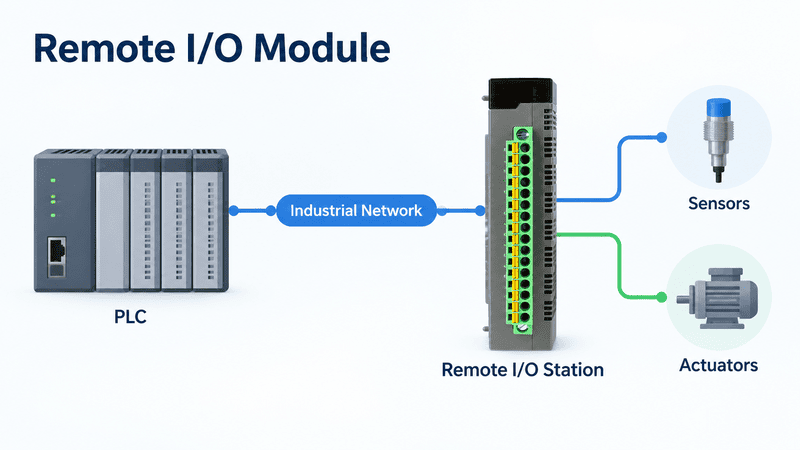
A remote I/O adapter communicates with the controller and manages the local I/O station; the installed input and output modules still perform the electrical connection to sensors and actuators.
Remote I/O can reduce the length and volume of individual field cables. Instead of routing every sensor and actuator conductor back to the main PLC cabinet, the field wiring terminates at a remote station, and the station exchanges I/O data with the controller over a network.
The architecture may be summarized as:
Main PLC CPU
    │
Industrial Network
    │
Remote I/O Adapter or Interface
    │ local backplane or bus
DI / DO / AI / AO / Safety / Specialty Modules
    │
Nearby Sensors and ActuatorsYes, when compatible I/O modules are installed and configured, those channels become part of the controller’s I/O system. This is different from a passive external breakout module, which only makes existing points easier to wire.
| Item | Main checks |
|---|---|
| Network adapter/interface | Protocol, controller compatibility, topology, node/connection limits, firmware |
| I/O modules | Signal type, channel count, electrical ratings, diagnostics, safety requirements |
| Terminal bases | Exact module compatibility, terminal style, keying, wiring capacity |
| System/backplane power | Adapter capacity, module consumption, expansion-power rules |
| Field power | Sensor and load voltage, total current, groups, isolation, branch protection |
| Physical installation | DIN rail, enclosure, temperature, vibration, grounding, cable entry |
| Engineering configuration | Device files, module order, addressing, update time, diagnostics |
Rockwell’s POINT I/O documentation is a useful concrete example: it separates the communication interface, I/O modules, terminal bases, and power-distribution components and requires selection of adequate backplane-current capacity. Those limits are not transferable to another product family, but the selection sequence is broadly useful.
A PLC module normally belongs to the controller or remote-I/O platform and exchanges power, configuration, or data through that platform. An external PLC interface module normally sits between an existing I/O module and field wiring to break out, route, distribute, switch, protect, isolate, or condition circuits.
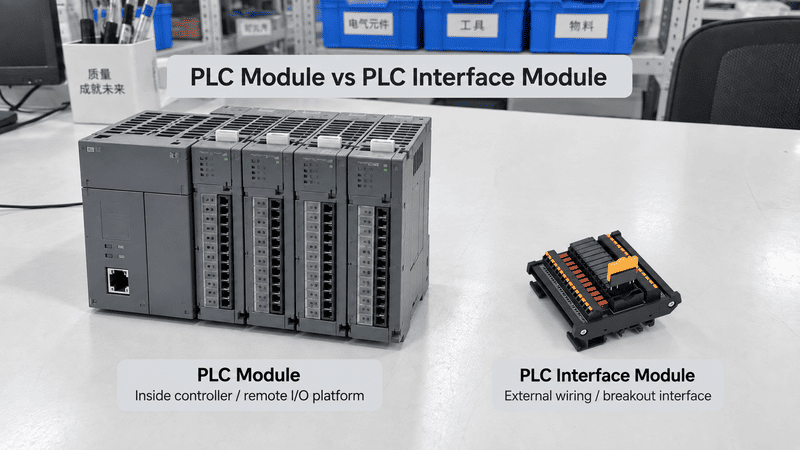
The internal I/O module creates or reads configured PLC channels; the external interface module makes those existing channels easier or safer to connect to field devices, depending on its circuit.
This naming overlap is one of the biggest sources of incorrect quotations. In some PLC manuals, interface module means the device that links a rack or remote I/O station to the controller. In control-cabinet wiring, the same phrase may describe a DIN-rail unit that converts a multipole PLC connector into field terminals.
| Question | PLC or remote-I/O module | External PLC interface module |
|---|---|---|
| Where is it installed? | In the PLC rack, base, side bus, or remote-I/O station | Between the I/O card/cable and field wiring |
| Does it communicate on the PLC backplane or fieldbus? | Normally yes | A passive version normally does not |
| Is it configured in PLC software? | Normally yes | Passive versions normally are not |
| Does it add configured I/O channels? | An I/O module does | A passive interface does not |
| What selects it? | PLC platform, CPU support, slots, firmware, signal type, power budget | I/O connector, pin mapping, channel circuit, voltage/current, terminals, cable |
| Can it contain relays or signal conditioning? | Some PLC modules can | Active interface versions can |
| Can a similar connector prove compatibility? | No | No |
Weidmüller describes active and passive PLC interface products with integrated functions such as fuses, disconnectors, and relays.9 That is the external field-wiring meaning used in this section.
For a detailed explanation of passive connector-to-terminal boards, relay interfaces, circuit relationships, channel count, and field-wiring selection, see our PLC Interface Modules Explained: Types, Wiring, Functions, and How to Choose. This article keeps that subject concise so the two pages answer different questions.
A passive PLC interface module does not add I/O points. It provides another physical connection path for channels that already exist on the PLC I/O card. Additional points require compatible I/O hardware that the PLC can detect, configure, address, and exchange data with.
Consider a 16-point digital input card connected to a 16-channel connector-to-terminal interface. The interface may provide convenient signal, 24 V, and 0 V terminals, but the PLC still has the same 16 input points.
16 configured PLC input points
           │
16-channel prewired cable
           │
16-channel terminal interface
           │
16 field input circuits

Result: still 16 PLC input points
An active relay interface also does not automatically increase the channel count. Sixteen relay channels may allow the 16 PLC outputs to switch separate field circuits, but they remain 16 controller commands unless another compatible I/O module is added to the PLC system.
| Hardware change | Adds PLC I/O points? | Reason |
|---|---|---|
| Add a passive connector-to-terminal board | No | It only breaks out existing conductors |
| Add a relay interface to existing outputs | No | It changes the switching interface, not the configured point count |
| Add a fused distribution module | No | It distributes or protects power branches |
| Add a signal conditioner to an analog input | No | It adapts one existing signal path |
| Add a compatible configured local I/O module | Yes | The PLC platform recognizes additional channels |
| Add compatible remote I/O modules through an adapter | Yes | The controller exchanges data with newly configured remote channels |
This is an important commercial boundary. If a customer needs eight more input points, I would not quote an eight-channel passive terminal interface as the solution. I would first direct the requirement back to the PLC platform and supported expansion hardware. The external interface can then be selected after the new I/O module is confirmed.
An external interface is useful when existing PLC I/O points need faster termination, clearer wiring, relay switching, signal isolation or conversion, branch protection, disconnect points, or organized power distribution. The required electrical function determines the interface type.
A prewired connector-to-terminal module can make high-density I/O easier to install and service. A relay interface can switch a separate contact circuit or provide galvanic separation. A signal conditioner can isolate or convert a signal—for example, between 4–20 mA and 0–10 V. Phoenix Contact documents this conversion example and distinguishes active from passive signal inputs.10 A distribution module can organize field-power branches, but a plain bus does not provide individual protection unless fuses or electronic protection are actually built into the circuit.
| Project need | Suitable interface function | What I would verify first |
|---|---|---|
| Make a 40-pin I/O connector serviceable | Connector-to-terminal breakout | Exact card, mating connector, pin map, common pins, cable mapping |
| Switch a load beyond a PLC transistor channel’s direct capability | Relay or solid-state interface | Output type, interface input, load voltage/current, inrush, AC/DC, life and heat |
| Separate a noisy field signal | Isolating signal conditioner | Signal range, active/passive loop, isolation rating, accuracy, response |
| Distribute one DC supply to multiple loads | Power distribution module | Total current, branch current, common return, conductor size, protection |
| See and disconnect individual circuits during maintenance | LED/fused/disconnect interface | Circuit polarity, operating voltage, fuse type, safe isolation procedure |
| Retain field wiring during a PLC migration | Verified migration interface and system cable | Old/new I/O maps, connector drawings, circuit behavior, testing plan |
Choose a PLC module from the exact controller platform, required function, signal and load data, supported installation position, power budget, network architecture, safety requirement, and software or firmware compatibility. Do not select from channel count or physical appearance alone.
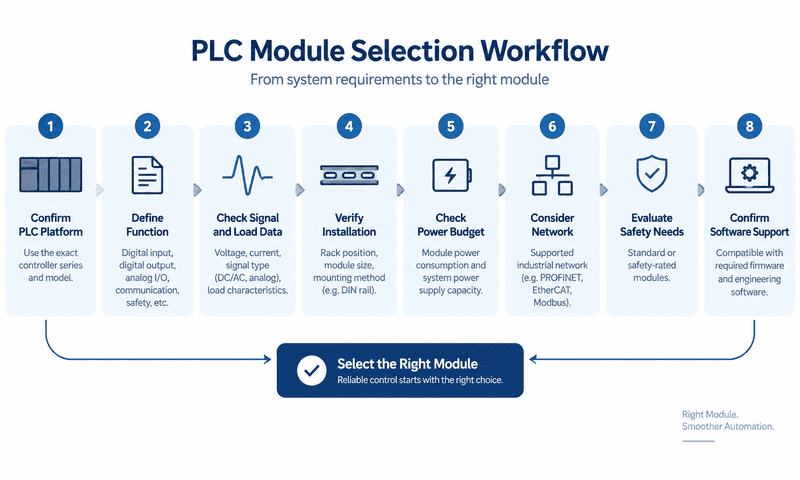
A reliable selection starts with the PLC platform and required function, then verifies channels, electrical ratings, system power, software support, terminal hardware, and the complete field circuit.
Record the manufacturer, controller family, complete CPU number, hardware revision, and firmware. A family name such as S7-1500, CompactLogix, Micro800, CJ, NX, or MELSEC is not a compatibility statement by itself.
State whether the requirement is:
This prevents an external terminal module from being quoted when the project actually requires configured I/O expansion.
For each channel group, record:
A phrase such as “16-channel module” does not say whether the channels are 24 VDC inputs, relay outputs, 4–20 mA inputs, or passive terminal paths.
For an input, identify the sensor or transmitter circuit. For an output, record load voltage, steady and inrush current, load type, switching frequency, and suppression. For analog signals, confirm the range and whether each device is active or passive. A 4–20 mA to 0–10 V converter works only when its input, output, supply, isolation, and load fit the loop.
Check:
Never assume that a module from the same brand fits every controller generation.
Calculate module-electronics current using the manufacturer’s rules. Then calculate field-supply demand separately, including sensors, transmitters, relay coils, solenoids, indicators, interface electronics, and planned simultaneous operation.
Rockwell’s 1769 Compact I/O technical data directs users to product-specific information for module placement, configuration, and monitoring.11 This is a useful reminder that the module list and power arrangement must be checked as a system rather than as isolated catalog pages.
The original PLC module may require a terminal base, removable terminal block, front connector, or manufacturer-specific cable. If an external interface is used, verify connector gender, keying, pin numbering, pin-to-terminal mapping, wire size, cable length, shield connection, common buses, and current limits.
Confirm temperature, orientation, enclosure, contamination, vibration, EMC, altitude, and required approvals. Check certification for the exact catalog number and installation, not from a family logo.
Configure the correct slot or node, channel parameters, addresses or tags, and diagnostics. Before use, verify field signals, fail states, scaling, alarms, output direction, and safety functions under the project’s commissioning procedure.
The wrong module can cause anything from a software configuration error to incorrect readings, damaged field devices, uncontrolled loads, unreliable diagnostics, or an unsafe circuit. Physical fit and matching voltage labels are not enough to prove suitability.
| Selection error | Likely result | Prevention |
|---|---|---|
| Module belongs to another PLC generation | It may not connect, be recognized, or be supported in software | Check CPU/module compatibility list and revisions |
| Backplane power budget is exceeded | Modules may fail to start, reset, or behave intermittently | Calculate system current with the manufacturer’s tool or manual |
| 24 VDC input chosen for an incompatible source/sink circuit | Input may never turn on or may be wired incorrectly | Match PNP/NPN, common, thresholds, and circuit diagram |
| Relay output selected without checking inrush | Contacts may weld or have shortened life | Use load-specific ratings and consider an interposing device |
| 0–10 V input used for a 4–20 mA transmitter | Reading is wrong or the loop cannot operate | Match signal type or use a correctly specified converter |
| Non-isolated channels used where isolation is required | Ground-loop current, noise, or fault propagation may occur | Define isolation and common-mode requirements before selection |
| Standard I/O used for a required safety function | Required safety performance is not achieved | Use the approved safety architecture and validate it |
| Passive interface mistaken for an expansion module | No new I/O points appear in the PLC | Add supported I/O hardware, then select the wiring interface |
| Connector mates but pin mapping differs | Signals and power reach the wrong terminals | Verify drawings and continuity before energizing |
| Wrong firmware/software support assumed | Module configuration or diagnostics may be unavailable | Check release notes and exact engineering version |
One of the most dangerous phrases in a sourcing conversation is “the connector is the same.” Mechanical mating only answers one question. Electrical mapping, protocol, voltage, current, common arrangement, insulation, and software support still need independent proof.
Before requesting or approving hardware, confirm the controller, module function, signal and load data, system location, connector and pin mapping, power arrangement, software support, and installation conditions. The information list should change depending on whether the item is an original PLC module or an external wiring interface.
At NITAI, I would rather receive an incomplete but clearly labeled wiring package than a confident description built around the wrong product name. Exact PLC and I/O part numbers plus a marked drawing help me separate original PLC hardware from external terminal, relay, signal, or distribution work.
| Information | Example of a useful answer |
|---|---|
| PLC manufacturer and CPU | Full catalog number, hardware version, firmware |
| Local or remote location | Main rack, expansion rack, or named remote station |
| Required module function | 16 DI, 8 relay DO, 4 AI 4–20 mA, encoder counter, safety DI |
| Compatible base or slot | Rack/base/terminal-base model and intended position |
| Signal specification | Voltage/current range, source/sink, active/passive loop, frequency |
| Field-device data | Sensor or load model, consumption, inrush, wiring diagram |
| Network details | Protocol, adapter, topology, node role, update requirement |
| Power budget | Module current, adapter capacity, field-power demand |
| Software details | Engineering platform and version, device profile, firmware |
| Safety requirement | Required safety function and approved architecture documentation |
| Information | Why I need it |
|---|---|
| Exact I/O card and front connector | Defines the original channel and connector arrangement |
| Connector photo and drawing | Helps confirm type, gender, keying, orientation, and pin numbering |
| Pin-to-terminal map | Prevents a mechanically fitting but electrically incorrect assembly |
| Channel count and circuit relationship | Distinguishes one-to-one breakout, common distribution, relay switching, and conversion |
| Signal and voltage/current | Defines conductor, PCB, terminal, relay, fuse, and component requirements |
| PNP/NPN or source/sink logic | Determines common and polarity arrangement |
| Terminal type and conductor size | Defines field-side installation |
| Cable ends, length, and shield | Defines the complete prewired connection |
| Required relay, fuse, LED, isolation, or conversion | Defines whether the interface is passive or active |
| DIN-rail and space limits | Confirms mechanical fit and service access |
| Drawing, sample, and testing plan | Establishes how compatibility will be proven before volume production |
For an initial discussion, send the PLC CPU and I/O module part numbers, connector-label photos, manufacturer wiring diagram, channel and signal data, voltage/current/load information, required pin map, and cabinet or terminal preferences. The PLC manufacturer should confirm controller compatibility, firmware, safety, and configuration. NITAI can then review the documented external connection and interface requirements.
The most useful short answers keep hardware function, PLC compatibility, electrical signal, and external wiring separate.
A PLC module is hardware. It may require a corresponding software configuration, function block, device profile, or firmware version, but the module itself is a physical unit.
Yes, in a modular PLC the CPU is commonly a distinct controller module. In a compact PLC, the CPU and built-in I/O may be integrated in one unit.
No. Compact PLCs integrate several functions in one controller, although some still accept plug-in or expansion modules. Modular PLCs provide more separate hardware choices but remain limited to their supported platform.
PLC module is the broader term. An I/O module is one PLC-module category specifically used to receive field inputs or control field outputs.
It normally means 16 functional signal channels, but the signal type is still unknown. It could be 16 digital inputs, 16 transistor outputs, 16 relay paths, or 16 passive interface channels. The terminals and common circuits may number more than 16.
Not on the assumption that they look similar. Native rack and expansion modules are normally platform-specific. Third-party or networked devices may be usable only when the controller, protocol, device profile, electrical interface, and engineering software explicitly support them.
Not as a measured process value. A digital input only determines an ON/OFF state according to defined thresholds. A compatible analog input or signal converter is needed to measure a variable voltage or current.
Yes, if the selected PLC platform supports the required modules, channel types, power budget, and configuration. Many modular systems combine DI, DO, AI, AO, communication, and specialty modules in one architecture.
Not necessarily. A PLC rack or remote-I/O interface can be a communication device, but an external connector-to-terminal interface may be completely passive. Always identify its location and internal function.
No, not if it only routes, switches, protects, or conditions existing channels. Additional PLC points require compatible I/O hardware that the controller recognizes and configures.
Not when the safety function requires approved fail-safe hardware and architecture. Safety selection and validation must follow the applicable risk assessment, standards, and exact manufacturer documentation.
Check the PLC manufacturer’s hardware catalog and system manual for the exact CPU, module, base or rack, slot, firmware, software version, power budget, and supported configuration. For an external interface, separately verify the connector, pin mapping, signal type, circuit, ratings, and cable.
A PLC module is a hardware unit that performs a defined job within a programmable control system. CPU, power, I/O, communication, technology, safety, and remote-I/O modules belong to the control architecture; external PLC interface modules belong to the field-wiring layer and do not normally add PLC I/O points.
The practical lesson is to replace the broad question “Which PLC module do I need?” with three clearer questions:
If your project concerns the external connection between a confirmed PLC I/O module and field devices, send NITAI the PLC and I/O part numbers, connector drawing, pin map, channel count, signal type, working voltage/current, required relay or isolation function, terminal preference, and cable details. We can review the terminal-conversion, relay-interface, signal-interface, or power-distribution requirement without misrepresenting it as original PLC expansion hardware.
International Electrotechnical Commission, [IEC 61131-2:2017 — Industrial-process measurement and control: Programmable controllers, Part 2](https://webstore.iec.ch/en/publication/31007). The official abstract supports the stated scope for PLC/PAC equipment, associated peripherals, functional requirements, EMC requirements, and verification tests. It does not define one universal module arrangement or make products from different platforms interchangeable. ↩
Rockwell Automation, [Micro800 Programmable Controller Family Selection Guide](https://literature.rockwellautomation.com/idc/groups/literature/documents/sg/2080-sg001_-en-p.pdf). This official guide supports the compact-controller example with embedded I/O, plug-in modules, and expansion options. Features and compatible accessories depend on the exact Micro800 controller and should not be generalized to every compact PLC. ↩
Siemens, [SIMATIC S7-1500 Programmable Logic Controller](https://www.siemens.com/en-us/products/simatic/s7-1500/). This official product overview supports the distinction between signal modules for I/O and technology modules for specialized functions such as counting. Detailed availability and specifications depend on the selected S7-1500 CPU and module. ↩
Rockwell Automation, [Input/Output (I/O) Products](https://www.rockwellautomation.com/en-us/products/hardware/i-o.html). The manufacturer’s I/O overview supports the explanation that industrial I/O modules connect sensors, actuators, and other field devices with controllers. It is a general product overview, so final electrical selection still requires the exact module technical data. ↩
Rockwell Automation, [POINT I/O Modules Selection Guide](https://literature.rockwellautomation.com/idc/groups/literature/documents/sg/1734-sg001_-en-p.pdf). This official guide supports the separation of communication interfaces, I/O modules, terminal bases, power-distribution components, backplane power, and field wiring in a modular remote-I/O family. Its numerical capacities, power conversion, and compatible combinations apply only to the listed POINT I/O products. ↩
Phoenix Contact, [IB ST 24 BAI 8/EF Analog I/O Module](https://www.phoenixcontact.com/en-ca/products/io-component-ib-st-24-bai-8ef-2700842). This official product page supports the example of an I/O module designed to acquire analog voltage and current signals. Signal ranges, channel behavior, and wiring must be taken from the exact selected module. ↩
International Electrotechnical Commission, [IEC 61131-6:2012 — Functional safety](https://webstore.iec.ch/en/publication/4555). The official abstract supports the statement that this part applies to PLCs and associated peripherals intended as the logic subsystem of an E/E/PE safety-related system. It does not replace a project-specific risk assessment or validation. ↩
Siemens, [SIMATIC S7-1200 G2 Fail-safe Signal Modules Manual](https://support.industry.siemens.com/cs/attachments/109986785/s71200_G2_f_io_manual_en-US_en-US.pdf). This official manual supports the example of signal modules with integrated safety functions for fail-safe operation. Wiring, diagnostics, supported CPUs, and safety parameters are specific to the documented products and system version. ↩
Weidmüller, [PLC Interfaces and Pre-assembled Cables](https://www.weidmueller.com/int/products/connectivity/plc_interfaces_and_migration_solutions/plc_interfaces_passive.jsp). This official overview supports the external field-wiring meaning of active and passive PLC interfaces and functions such as fuses, disconnectors, and relays. The exact function and ratings depend on the selected interface. ↩
Phoenix Contact, [Digital and Analog Signal Conditioning](https://www.phoenixcontact.com/en-pc/technologies/industrial-signal-processing/digital-and-analog-signal-conditioning). This official technical overview supports the 4–20 mA to 0–10 V conversion example and the distinction between active and passive signal inputs. A real circuit still requires product-specific range, supply, load, accuracy, and isolation checks. ↩
Rockwell Automation, [1769 Compact I/O Modules Specifications](https://literature.rockwellautomation.com/idc/groups/literature/documents/td/1769-td006_-en-p.pdf). This official technical publication supports the need to follow platform-specific placement, configuration, monitoring, and installation documentation for modular I/O. Its specifications apply only to the listed 1769 products. ↩
An M12 male connector 5-pin B-coded may look like a straightforward line item, but its name does not…
5V relay modules are used to let a low-voltage controller switch a separate electrical circuit, but many buyers…
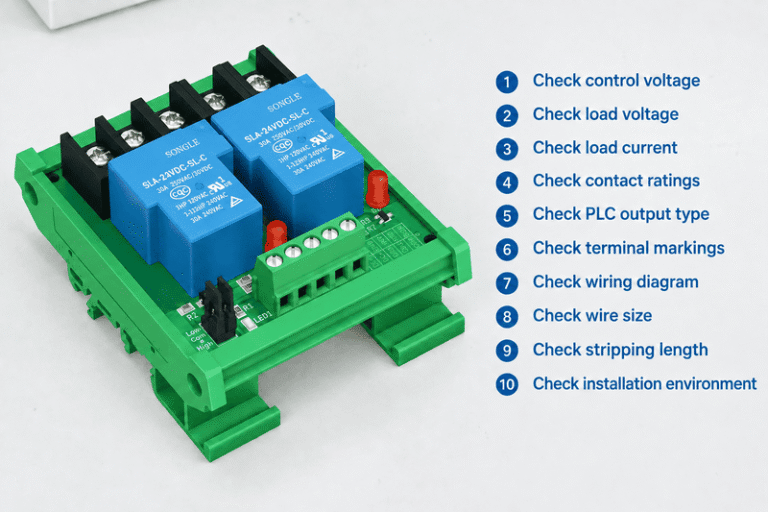
A relay module looks simple until a control cabinet fault appears after commissioning. One wrong assumption about COM,…
NITAI manufactures terminal blocks, M8/M12 waterproof connectors and industrial distribution modules for global OEMs, distributors and automation customers.
Leave a Reply